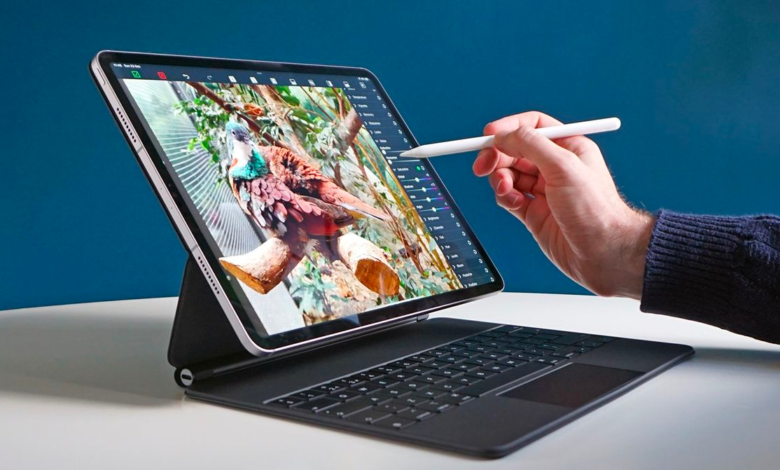
When selecting the best keyboards for your iPad Pro, it’s important to consider factors like typing comfort, portability, and additional features. Here are some of the top options for iPad Pro keyboards, known for their quality, performance, and functionality iPad Pro Keyboards.
iPad Pro Keyboards are external or integrated keyboard accessories designed to enhance the productivity and functionality of an iPad Pro. They transform the tablet into a more versatile device, akin to a laptop, enabling better typing, multitasking, and navigation.
Why Use an iPad Pro Keyboard?
- Enhanced Typing Experience: The on-screen keyboard can feel cramped for long typing sessions. A physical keyboard provides tactile feedback and comfort.
- Increased Productivity: With keyboard shortcuts, trackpads, and function keys, tasks like editing documents, coding, or browsing become more efficient.
- Laptop-Like Functionality: Many iPad Pro keyboards include trackpads, allowing cursor support and gestures in iPadOS for a laptop-like experience.
- Portability: These keyboards are lightweight and designed to complement the iPad Pro’s portability.
Types of iPad Pro Keyboards
- Keyboard Cases:
- Combine a keyboard with a protective case.
- Often feature adjustable viewing angles and integrated trackpads.
- Examples: Apple Magic Keyboard, Logitech Combo Touch.
- Detachable Keyboards:
- Can be separated from the iPad for flexibility.
- Useful when switching between tablet mode and typing mode.
- Examples: ZAGG Pro Keys, Logitech Slim Folio Pro.
- Standalone Bluetooth Keyboards:
- Independent keyboards that connect via Bluetooth.
- Often mechanical or compact, suitable for those who need portability without a case.
- Examples: Keychron K3, Arteck Wireless Keyboard.
Features to Look for in iPad Pro Keyboards
- Compatibility:
- Ensure the keyboard supports your specific iPad Pro model and size (11-inch or 12.9-inch).
- Connection Type:
- Smart Connector: No need for Bluetooth or charging the keyboard; draws power from the iPad.
- Bluetooth: Requires pairing and charging but is compatible with multiple devices.
- Backlit Keys:
- Ideal for typing in low-light conditions.
- Trackpad Support:
- For cursor control and gestures in iPadOS.
- Battery Life:
- Some keyboards rely on their battery (Bluetooth models), while others draw power from the iPad (Smart Connector models).
- Typing Comfort:
- Look for responsive keys with adequate travel and spacing.
- Portability:
- Slim and lightweight keyboards are easier to carry.
Examples of iPad Pro Keyboards
- Apple Magic Keyboard: Premium option with a built-in trackpad and sleek design.
- Logitech Combo Touch: Detachable keyboard case with a trackpad and robust protection.
- Brydge Pro+: Laptop-style keyboard with an aluminum build and a trackpad.
- ZAGG Pro Keys: Detachable, affordable keyboard with a long battery life.
- Keychron K3: Slim mechanical keyboard for enthusiasts.
Who Should Use iPad Pro Keyboards?
- Students: For taking notes, writing essays, or attending online classes.
- Professionals: For document editing, presentations, and multitasking.
- Casual Users: For emails, browsing, or casual typing.
- Creative Users: When combined with Apple Pencil for design or writing workflows.
With the right keyboard, the iPad Pro becomes a powerful tool for work and creativity, blending the portability of a tablet with the productivity of a laptop.
Here’s a detailed list of iPad Pro keyboard options, their key specifications, and how well they work for different uses:
8 Best iPad Pro Keyboards:
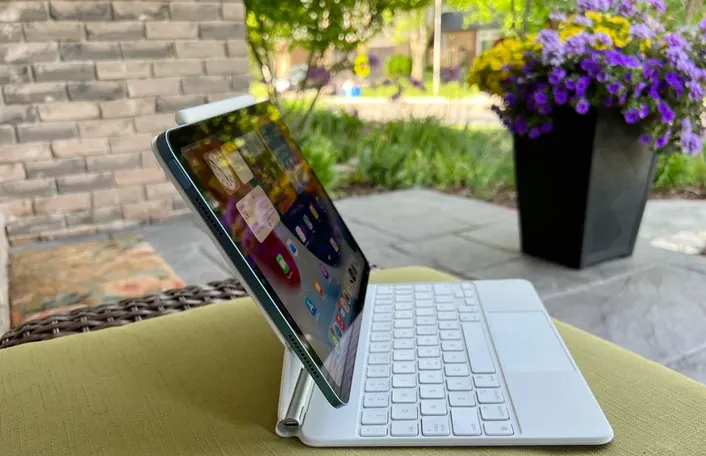
1. Apple Magic Keyboard
- Features:
- Float design with adjustable viewing angles.
- Built-in trackpad for mouse functionality.
- High-quality typing experience with responsive keys.
- USB-C pass-through charging.
- Pros: Premium build, comfortable typing, and integrated trackpad.
- Cons: Expensive and adds considerable weight to the iPad.
- Specifications:
- Compatibility: iPad Pro 11-inch (1st, 2nd, and 3rd generation) and iPad Pro 12.9-inch (3rd, 4th, and 5th generation).
- Connection: Magnetic connector, no Bluetooth pairing required.
- Backlit Keys: Yes, adjustable brightness.
- Trackpad: Built-in trackpad for multitouch gestures and iPadOS cursor control.
- Charging: USB-C port for pass-through charging of iPad.
- Weight: 710g (for 12.9-inch model).
- How it Works:
- The Magic Keyboard provides a floating design with a precise magnetic connection. It automatically pairs with the iPad and offers the most seamless experience for iPadOS, including gestures using the trackpad. The backlit keys are great for working in various lighting conditions. It allows you to adjust the iPad’s angle, but the overall weight is heavier than other keyboard cases.
2. Logitech Combo Touch
- Features:
- Detachable keyboard with a protective case.
- Built-in trackpad (similar to the Magic Keyboard).
- Multiple viewing angles.
- Pros: More affordable than the Magic Keyboard, solid build, and long battery life.
- Cons: Slightly bulkier than other options.
- Specifications:
- Compatibility: iPad Pro 11-inch (1st, 2nd, and 3rd generation) and iPad Pro 12.9-inch (3rd, 4th, and 5th generation).
- Connection: Smart connector (no Bluetooth required).
- Backlit Keys: Yes, 4-level backlight.
- Trackpad: Integrated trackpad for iPadOS gestures.
- Keyboard Layout: Full-size, with function keys.
- Weight: 750g (for 12.9-inch model).
- How it Works:
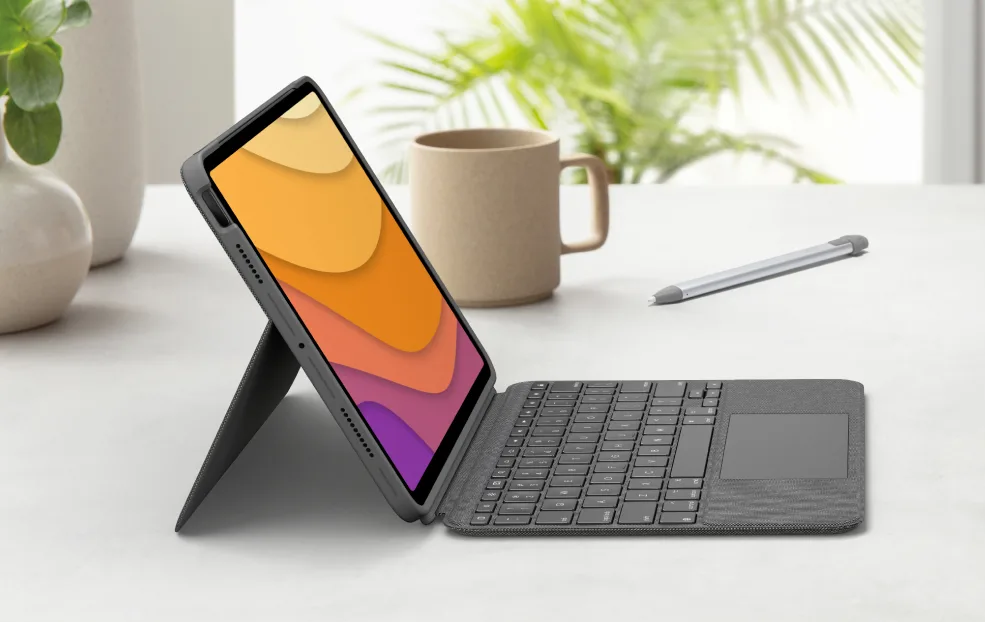
- This keyboard case connects through the Smart Connector and provides a solid typing experience. The trackpad is responsive and works well with iPadOS. The design is more robust than a traditional folio, offering protection while keeping the keyboard separate. The detachment feature allows you to use the keyboard and iPad independently.
3. Arteck Wireless Keyboard
- Features:
- Ultra-thin, compact design.
- Bluetooth connectivity for seamless pairing.
- Quiet keys with an efficient layout.
- Pros: Very affordable, portable, and long battery life.
- Cons: Lacks a trackpad and function keys.
- Specifications:
- Compatibility: iPad Pro (any model).
- Connection: Bluetooth.
- Backlit Keys: No.
- Trackpad: No.
- Keyboard Layout: Compact layout.
- Battery Life: 6 months (rechargeable).
- Weight: 450g.
- How it Works:
- The Arteck Wireless Keyboard is a compact Bluetooth keyboard ideal for portability. It’s a budget-friendly option with long battery life, but lacks the advanced features (like a trackpad or backlit keys) found in premium options. It’s a great option for light typing tasks and everyday use.

4. Logitech Slim Folio Pro
- Features:
- Slim, lightweight design.
- Full-size backlit keyboard.
- Battery life of up to 3 months (uses replaceable batteries).
- Pros: Affordable, slim design, and comfortable typing.
- Cons: No trackpad and fewer angles for adjusting the iPad’s position.
- Specifications:
- Compatibility: iPad Pro 11-inch (1st, 2nd, and 3rd generation) and iPad Pro 12.9-inch (3rd, 4th, and 5th generation).
- Connection: Bluetooth.
- Backlit Keys: Yes, backlit.
- Keyboard Layout: Full-size keys, with shortcut keys for iPadOS.
- Battery Life: Up to 3 months with 2x AAA batteries (included).
- Weight: 400g.
- How it Works:
- The Slim Folio Pro is a thin and light Bluetooth keyboard that provides a full typing experience. It’s good for both casual and heavy typing but lacks a trackpad, so it might be less versatile compared to options with a trackpad. The long battery life (using replaceable AAA batteries) is a unique feature, especially for those who don’t want to worry about charging it often.

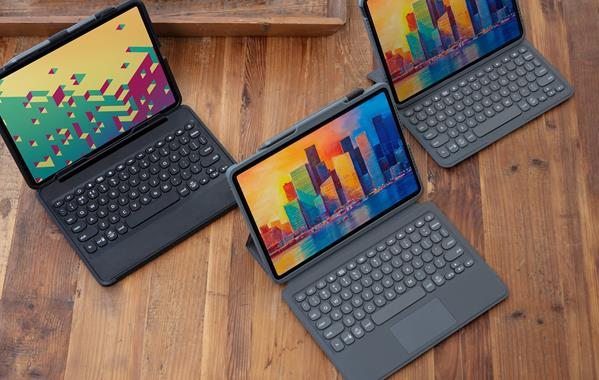
5. ZAGG Pro Keys
- Features:
- Detachable keyboard with a protective case.
- Full-size backlit keyboard.
- Long battery life (up to 1 year on a single charge).
- Pros: Durable case, comfortable typing, and affordable.
- Cons: Doesn’t have the premium feel of the Magic Keyboard.
- Specifications:
- Compatibility: iPad Pro 11-inch (1st, 2nd, and 3rd generation) and iPad Pro 12.9-inch (3rd, 4th, and 5th generation).
- Connection: Bluetooth.
- Backlit Keys: Yes, 7 color options with adjustable brightness.
- Trackpad: Built-in trackpad.
- Keyboard Layout: Full-size keyboard.
- Battery Life: Up to 1 year on a single charge (USB-C charging).
- Weight: 600g (for 12.9-inch model).
- How it Works:
- The ZAGG Pro Keys offers a detachable keyboard with a protective case and an integrated trackpad. The keyboard provides a good typing experience, and the case has a soft-touch finish for added durability. The long battery life is ideal for those who want a reliable keyboard without frequent charging.
6. Keychron K3 (Bluetooth Mechanical Keyboard)
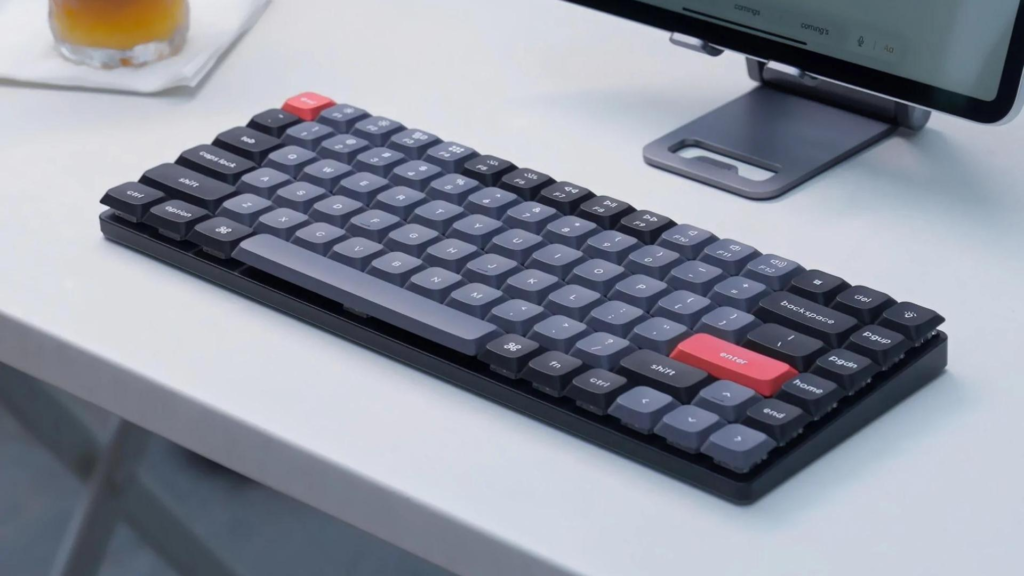
- Features:
- Slim mechanical keyboard with Bluetooth support.
- Option for hot-swappable switches.
- Compatible with multiple devices, including iPad Pro.
- Pros: Great for those who prefer mechanical keys and a compact design.
- Cons: Mechanical keys can be noisy, so not ideal for quiet environments.
- Specifications:
- Compatibility: iPad Pro 11-inch and 12.9-inch (via Bluetooth or USB-C).
- Connection: Bluetooth (or wired via USB-C).
- Backlit Keys: Yes, RGB backlight.
- Trackpad: No.
- Keyboard Layout: Compact mechanical key switches (option for hot-swappable keys).
- Battery Life: Up to 72 hours of typing on a full charge.
- Weight: 400g.
- How it Works:
- The Keychron K3 is a mechanical keyboard designed for those who prefer tactile feedback. It connects via Bluetooth or USB-C and is compatible with a wide range of devices. The compact size and slim profile make it portable, and it’s an excellent choice for those who love mechanical keys. However, it lacks a trackpad, which may limit functionality compared to other options.
7. Brydge Pro+
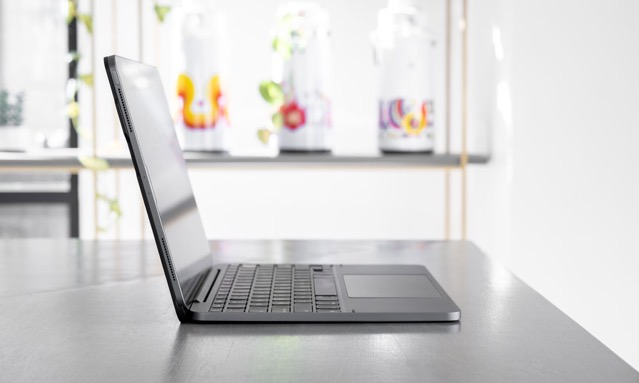
- Features:
- High-quality aluminum body.
- Built-in trackpad for iPadOS.
- Adjustable viewing angles and multi-device support.
- Pros: Solid typing experience and aesthetic appeal.
- Cons: Heavier than some other keyboard cases.
- Specifications:
- Compatibility: iPad Pro 11-inch (1st, 2nd, and 3rd generation) and iPad Pro 12.9-inch (3rd, 4th, and 5th generation).
- Connection: Bluetooth.
- Backlit Keys: Yes.
- Trackpad: Built-in trackpad for iPadOS cursor support.
- Keyboard Layout: Full-size, with function keys.
- Weight: 693g (for 12.9-inch model).
- How it Works:
- The Brydge Pro+ offers a full-size keyboard with a solid aluminum build and a built-in trackpad. It connects via Bluetooth, offering a comfortable typing experience that mimics a laptop. The trackpad supports gestures, making it a great option for multitasking and productivity. The keyboard is adjustable and allows multiple angles, though the device is heavier than some other options.
8. Belkin BOOST Charge Pro Keyboard Case
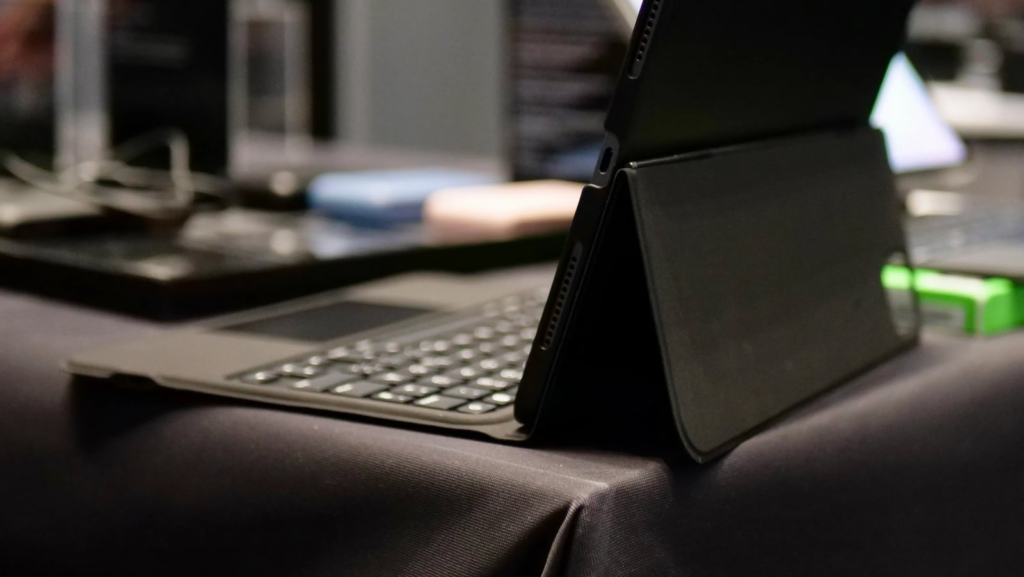
- Features:
- Slim and lightweight design.
- Integrated Apple Pencil holder.
- Good battery life and sturdy build.
- Pros: Sleek design and the ability to charge Apple Pencil while stored.
- Cons: Lacks a trackpad and feels less premium than others.
-
- Specifications:
-
-
- Compatibility: iPad Pro 11-inch (1st, 2nd, and 3rd generation) and iPad Pro 12.9-inch (3rd, 4th, and 5th generation).
- Connection: Smart connector.
- Backlit Keys: Yes.
- Trackpad: No.
- Keyboard Layout: Full-size keyboard with function keys.
- Battery Life: Uses iPad’s battery, no additional charging needed.
- Weight: 600g.
- How it Works:
-
-
-
- The BOOST Charge Pro offers a slim and portable case with a full-size keyboard. It uses the Smart Connector to pair automatically without needing Bluetooth. It’s great for those who prioritize portability and protection. However, it lacks a trackpad, making it less ideal for multitasking or extensive use of iPadOS gestures.
-
Summary:
- Best for Productivity & Functionality: Apple Magic Keyboard, Logitech Combo Touch, Brydge Pro+.
- Best for Budget: Arteck Wireless Keyboard, Logitech Slim Folio Pro.
- Best for Mechanical Keyboard Lovers: Keychron K3.
- Best for Portability & Protection: Belkin BOOST↑Charge Pro, ZAGG Pro Keys.
Each of these keyboards has its strengths based on your needs—whether it’s a premium experience with a trackpad, budget-friendly portability, or a mechanical typing experience.