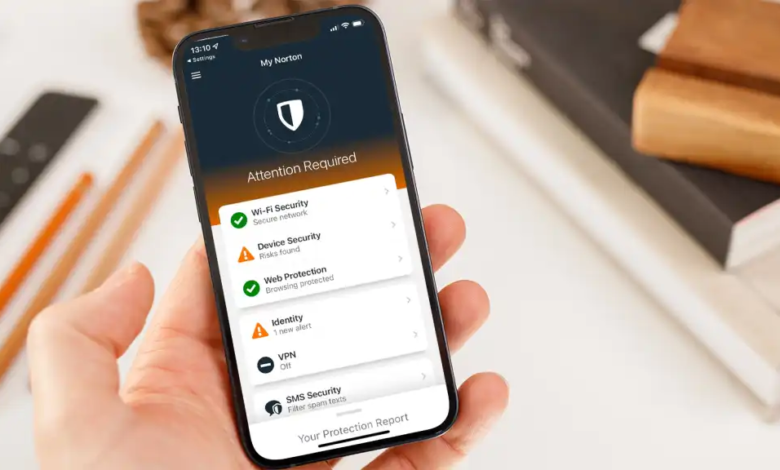
An antivirus is a type of software designed to protect your device from digital threats like viruses, malware, spyware, ransomware, and phishing attacks. On Android phones, antivirus apps work quietly in the background to keep your device safe while you browse the internet, install apps, and store personal information.
What Is It Antivirus?
An antivirus is a type of software that protects your device from harmful programs, often called malware. These harmful programs can include viruses, spyware, ransomware, or other malicious apps that can damage your device or steal your personal information.
Why It’s Important for Android Users
Android is generally secure, but threats exist, especially if you download apps from outside the official Google Play Store or click unknown links. An antivirus adds an extra layer of security, giving you peace of mind and keeping your personal data safe.
How to Choose the Right Antivirus for You
Step 1: Assess Your Risk
-
Low risk: Mostly Play Store apps → Free basic protection is enough
-
Medium risk: Install apps from multiple sources → Real-time protection recommended
-
High risk: Handle sensitive data or travel a lot → Advanced features like anti-theft and VPN are helpful
Step 2: Check Core Features
-
Malware detection
-
Phishing/web protection
-
App scanning
-
Real-time monitoring
Step 3: Consider Performance
-
Lightweight apps run quietly
-
Avoid apps that drain battery or slow down your phone
Step 4: Free vs Paid
-
Free: Basic protection, may show ads
-
Paid: Advanced protection, real-time scanning, extra tools
Step 5: Look for Extras (Optional)
-
Anti-theft tools
-
Wi-Fi security scanning
-
Phone optimization
-
VPN
5. Top Android Antivirus Apps (Recommended)
-
Norton Mobile Security: Excellent all-round protection, simple interface
-
Bitdefender Mobile Security: Strong detection, lightweight, fast
-
Malwarebytes Mobile Security: Great for spyware and ransomware
-
Avira Mobile Security: Good free option, basic protection
-
McAfee Mobile Security: User-friendly, includes extra tools
-
Avast / AVG Antivirus: Free, basic scanning with extras
-
TotalAV Mobile Security: Antivirus plus phone-cleaning features
6. Installation & Setup Guide
-
Open Google Play Store
-
Search for your chosen antivirus app
-
Tap Install
-
Open the app and follow the setup instructions
-
Run the first scan
-
Enable real-time protection if available
7. Android Antivirus Best Practices
-
Keep your phone updated
-
Install apps only from trusted sources
-
Avoid clicking suspicious links or emails
-
Scan your device regularly
-
Back up important data
How Downloading an Antivirus App Works
-
Choose a trusted app
-
Open the Google Play Store.
-
Search for a reputable antivirus app like Norton, Bitdefender, or Malwarebytes.
-
Make sure it’s from a trusted developer (look at reviews and ratings).
-
-
Install the app
-
Tap Install and wait a few seconds or minutes depending on your internet speed.
-
Once installed, open the app.
-
-
Set up the app
-
Most antivirus apps will ask for permissions to scan files, apps, or device storage.
-
Some may ask you to sign up or create an account.
-
Follow the on-screen instructions usually, it’s just a few taps to get started.
-
-
Run the first scan
-
Open the app and tap Scan.
-
The app will check for:
-
Malware
-
Spyware
-
Suspicious apps
-
Unsafe links or websites
-
-
-
Enable real-time protection (optional)
-
Many apps have a background protection feature.
-
It scans apps and files automatically as you use your phone.
-
Benefits of Downloading an Antivirus App
-
Protects against malware
-
Stops viruses, spyware, ransomware, and other malicious software from infecting your phone.
-
-
Blocks unsafe websites
-
Warns you if a website or link could steal your data or trick you.
-
-
Protects your personal data
-
Monitors app permissions and helps prevent apps from accessing sensitive information like contacts, messages, or location.
-
-
Prevents phishing & scams
-
Detects fake emails, messages, or websites that try to steal passwords.
-
-
Extra safety tools
-
Some apps offer:
-
Anti-theft features (find or lock your phone if lost)
-
Wi-Fi scanning (checks if networks are secure)
-
Phone performance tools (clean junk files, boost speed)
-
-
-
Peace of mind
-
Knowing your device is protected lets you browse, download, and use apps more safely.
-
Tip: Even with an antivirus, always download apps from the Play Store, avoid unknown links, and keep your phone updated. The antivirus is like a shield it protects you, but safe habits make it much stronger.
Best Android Antivirus Apps (Simple & Honest)
1. Norton Mobile Security
Norton is one of the most trusted names in cybersecurity, and its Android app is very easy to use. It runs quietly in the background, scans apps in real time, and warns you about dangerous websites or fake links.
Best for: People who want strong protection without dealing with complicated settings.
2. Bitdefender Mobile Security
Bitdefender is known for powerful protection that doesn’t slow down your phone. It detects malware quickly and has excellent web protection against phishing and scam sites.
Best for: Users who want high-level security with minimal impact on performance.
3. McAfee Mobile Security
McAfee offers good all-round protection and a user-friendly interface. It includes malware scanning, safe browsing, and extra privacy tools.
Best for: Users who want security plus additional features in one app.
4. Malwarebytes Mobile Security
Malwarebytes is especially good at detecting spyware, ransomware, and hidden threats. It’s lightweight and focuses more on deep scanning rather than flashy extras.
Best for: People worried about spyware, scam apps, or suspicious activity.
5. Avira Mobile Security
Avira is a solid option with a strong free version. It offers malware scanning, privacy checks, and basic web protection.
Best for: Users looking for reliable protection without paying much.
6. Avast / AVG Antivirus
Avast and AVG are popular free antivirus apps with similar features. They provide basic malware protection, junk cleaning, and security alerts, though they show ads in the free version.
Best for: Casual users who want free protection and extra tools.
7. TotalAV Mobile Security
TotalAV combines antivirus protection with performance and privacy tools. It’s easy to use and good for beginners.
Best for: Users who want security plus phone-cleaning features.
Do You Really Need an Antivirus on Android?
If you only download apps from the Play Store and keep your phone updated, Android is already fairly secure. However, an antivirus app is useful if you:
-
Install apps from outside the Play Store
-
Click unknown links or emails
-
Want extra protection and peace of mind
How I choose the Best Android Antivirus
1. Know Your Risk Level
Your antivirus decision should start with how you use your phone:
-
Low risk: You only download apps from the official Play Store and avoid clicking unknown links you might not need a paid antivirus at all.
-
Medium risk: You install apps from multiple sources (including outside the Play Store) and browse a lot online — a good antivirus can help.
-
High risk: You handle sensitive data, travel often, connect to open Wi-Fi, or test apps from unknown authors get a strong antivirus with real-time protection.
2. Check Core Protection
At the minimum, a good antivirus app should:
-
Detect malware and spyware
-
Scan apps and files
-
Warn you about dangerous websites
-
Protect against phishing and fake links
If it doesn’t do these reliably, it’s not worth installing.
3. Consider Performance & Battery Impact
Antivirus apps run in the background, so you want one that:
-
Doesn’t drain your battery fast
-
Doesn’t slow down your phone
-
Does scans quickly
Some powerful apps can be heavy, so balance protection with performance.
4. Free vs Paid
-
Free versions: Great for basic scanning and alerts, but may have ads and fewer features.
-
Paid versions: Usually include real-time protection, anti-phishing, anti-theft, advanced web protection, and more frequent updates.
If you’re serious about security, a paid version is often worth it.
5. Extra Features Useful or Not?
Some antivirus apps offer extras like:
-
App lock (protect specific apps with PIN)
-
Anti-theft features
-
Wi-Fi security checks
-
VPN (virtual private network)
Ask yourself: Do I really need these extras? Some are useful; others are just marketing.
6. Ease of Use
A good antivirus app should be:
-
Easy to understand
-
Clear in alerts (no confusing jargon)
-
Fast to set up
If it feels complicated, you might ignore it which defeats the purpose.
7. Update Frequency
Cyber threats evolve quickly. A reliable antivirus app should:
-
Update malware definitions often
-
Improve threat detection regularly
Apps that go months without updates may miss new malware.
8. Reputation & Trust
Choose brands with a solid history in security. Established names tend to have:
-
Better threat detection
-
More frequent patches
-
Larger security research teams
Newer or little-known apps might look tempting, but they may not be trustworthy.
9. Customer Support
Good support matters if something goes wrong. Check if the app offers:
-
Email or chat support
-
Help guides and FAQs
-
Quick responses to user issues
Android Antivirus Apps – FAQs
1. Do I really need an antivirus on my Android phone?
Not always. If you only download apps from the Google Play Store and avoid suspicious links, your phone is fairly safe.
You might need one if:
-
You install apps from unknown sources
-
You browse a lot or click random links
-
You want extra protection for personal data
2. Are antivirus apps free or paid?
Most antivirus apps offer both:
-
Free version: Basic malware scanning and alerts, sometimes with ads
-
Paid version: Real-time protection, phishing defense, anti-theft tools, and extra privacy features
3. Will antivirus apps slow down my phone?
It depends on the app. Some apps are lightweight and run quietly in the background, while others with many extra features may use more battery or memory.
4. Can antivirus apps protect against phishing and scams?
Yes. Many antivirus apps include web protection to warn you about fake websites, malicious links, or scam messages that try to steal your data.
5. How often should I scan my phone?
-
Initial scan: Right after installation
-
Regular scans: Once a week is good for most users
-
Real-time protection: If enabled, the app scans apps and files automatically
6. Will an antivirus app protect me if I lose my phone?
Some apps include anti-theft features like:
-
Locating your device
-
Locking your phone remotely
-
Wiping sensitive data
7. Can antivirus apps remove malware automatically?
Yes. When malware is detected, most apps will either:
-
Remove it automatically
-
Give you an option to delete or quarantine it
8. Are all antivirus apps trustworthy?
No. Stick to apps from well-known developers with good reviews. Avoid unknown or suspicious antivirus apps some could be malware themselves.
9. Do I still need safe habits if I have antivirus?
Absolutely. Antivirus apps are an extra layer of protection, not a replacement for:
-
Downloading apps only from trusted sources
-
Avoiding suspicious links or emails
-
Keeping your phone and apps updated
10. Can antivirus apps protect my Wi-Fi or internet usage?
Yes. Many apps can scan Wi-Fi networks for vulnerabilities and warn you about unsafe connections. Some also include VPNs for private browsing.