Gaming with Custom keyboard Keycaps: Setup, Tips, and Practices

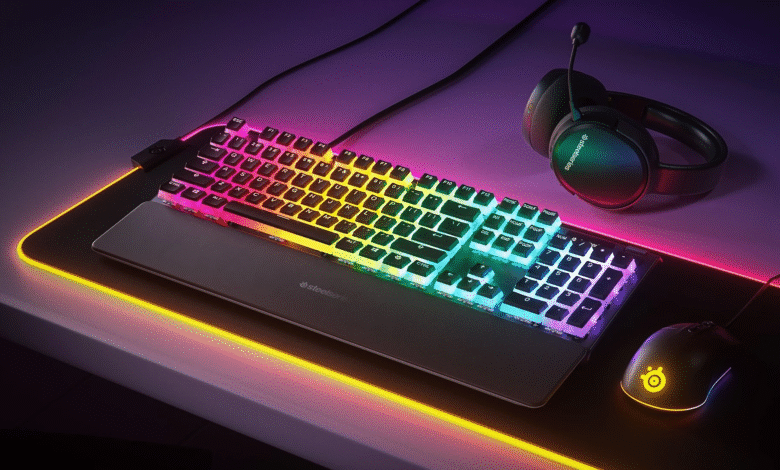
A gaming keyboard is more than just a tool for typing it’s a performance accessory designed to enhance speed, accuracy, and comfort during intense gaming sessions. Unlike standard office keyboards, gaming keyboards are built with mechanical or advanced optical switches, customizable RGB lighting, programmable keys, and higher polling rates that ensure every keystroke registers instantly.
For gamers and keyboard enthusiasts, All keycaps are more than just functional they’re a way to customize and personalize the keyboard experience. From high-quality materials like PBT that resist shine and wear, to artistic custom sets with unique themes, custom keycaps combine performance with style. Choosing the right set can transform an ordinary custom keyboard into a truly unique piece of gear.
What Are Keycaps?
Keycaps are the removable plastic covers that sit on top of keyboard switches. They’re the part you touch when you type or game. Keycaps not only make a keyboard usable but also affect comfort, durability, sound, and looks.
Key Things to Know About Keycaps
Printing/Legends (Letters & Symbols)
-
-
Pad Printed: Cheap, wears off fast.
-
Laser Etched: Durable, but may fade.
-
Dye Sublimation: Long-lasting, high quality.
-
Double-Shot: Best option — legends never fade.
-
Lighting Support
-
-
Shine-through (RGB compatible): Transparent legends let light pass.
-
Opaque: Blocks light, focuses on aesthetics.
-
Sound & Feel
-
-
Thick PBT or SA = deep “thock” sound.
-
ABS = lighter, higher-pitched “clack.”
-
Keycap Materials
ABS (Acrylonitrile Butadiene Styrene)
-
Smooth, lightweight, cheaper.
-
Legends can wear off and become shiny over time.
-
Common in stock keyboards.
PBT (Polybutylene Terephthalate)
-
Textured, durable, resists shine.
-
Heavier and more premium feel.
-
Most popular among enthusiasts.
POM (Polyoxymethylene)
-
Smooth and strong.
-
Less common but very durable.
Other Materials
-
Resin / Metal / Wood → Mostly for artisan/custom caps.
-
Rubberized Keycaps → Grip-enhanced, often used for WASD in gaming custom keyboard.
Keycap Profiles (Shape & Height)
-
OEM → Standard, slightly curved (found on most gaming keyboards).
-
Cherry → Lower profile than OEM, ergonomic, great for typing & gaming.
-
SA → Tall, rounded, retro look, deep “thock” sound.
-
DSA → Flat, uniform height, popular for custom layouts.
-
XDA → Similar to DSA but with wider surface area.
-
MT3 / KAT / KAM → Modern custom profiles (retro-inspired, sculpted, or uniform).
Keycap Printing (Legends/Letters)
-
Pad Printing → Cheap, wears off quickly.
-
Laser Etched → More durable but can fade.
-
Dye Sublimation (Dye-Sub) → Ink infused into plastic, highly durable.
-
Double-Shot → Two layers of plastic; legends never fade (best quality).
-
Reverse Dye-Sub → Used on dark keycaps with light legends.
-
Blank Keycaps → No legends; minimalist and stylish.
4. Types of All Keycaps by Use
-
Standard Sets → Full replacement sets for your keyboard.
-
Artisan Keycaps → Handmade, collectible, usually for a single key (ESC, Enter, Spacebar).
-
Themed Sets → Inspired by games, anime, retro tech (e.g., GMK Olivia, Godspeed).
-
Gaming Keycaps → Textured, colored, or rubberized WASD/QWER keys for better grip.
-
Pudding Keycaps → Transparent sides for brighter RGB shine-through.
5. Keycap Compatibility
-
Most use MX-style stems (+ shape) (Cherry MX, Gateron, Kailh, etc.).
-
Some brands need special caps (e.g., Razer optical, Logitech Romer-G, Topre).
-
Layouts differ:
-
ANSI (US) vs ISO (Europe)
-
60% / 65% / TKL / Full-size keyboards → need different kits.
-
How Do Keycaps Work?
-
Each keycap mounts onto a switch stem (like Cherry MX cross-shaped stems).
-
When pressed, the keycap pushes the switch, which sends a signal to your computer.
-
Compatibility depends on stem type (most common is Cherry MX style).
Where They’re Used
-
Gaming: RGB-friendly shine-through ABS or PBT keycaps.
-
Typing: Thick PBT, Cherry profile, or SA for satisfying sound.
-
Aesthetics: Custom sets, artisan keycaps, themed designs.
Full Guide What Are Custom Keycaps?
Custom keycaps are aftermarket keycap sets designed to replace the standard caps on your keyboard. They let you personalize your keyboard’s look, feel, sound, and durability. Enthusiasts choose them for aesthetics, typing comfort, or just for fun.
How to Use Keycaps & Keyboards for Gaming
1. Set Up Your Gaming Keyboard
-
Plug it in (USB or wireless dongle).
-
Install drivers/software (Razer Synapse, Logitech G Hub, SteelSeries GG, etc.) if your keyboard supports macros or RGB.
-
Make sure keycaps are firmly attached so they don’t pop off during intense gaming.
2. Choose the Right Keycaps for Gaming
-
PBT Shine-through keycaps → durable & good for RGB.
-
OEM or Cherry profile → comfortable height for long sessions.
-
Textured/WASD keycaps → help you find movement keys fast in shooters.
-
Artisan caps → fun for decoration, but not ideal for main gaming keys.
3. Customize Your Layout
-
Rebind keys in software or in-game settings (e.g., shift jump, side mouse buttons for reload).
-
Use macro keys for combos or quick actions in MMOs.
-
Set game profiles in your keyboard software so each game has its own layout.
4. Use RGB Lighting for Gaming Advantage
-
Highlight WASD or movement keys in one color.
-
Use different colors for abilities, weapons, or cooldown keys.
-
Set reactive effects (keys light up when pressed) for immersion.
5. Improve Comfort & Performance
-
Use a wrist rest to avoid fatigue.
-
Keep fingers on WASD + nearby keys (Q, E, R, F, Shift, Space).
-
Learn keyboard shortcuts & hotkeys for faster reactions.
6. Maintenance During Gaming
-
Keep hands clean (oil/grease wears keycaps faster).
-
Use keycap pullers to swap gaming caps (e.g., textured WASD sets).
-
Clean regularly to avoid sticky keys.
Example Gaming Setups
-
FPS (Call of Duty, Valorant, CS2):
-
Highlight WASD, Shift (sprint), Space (jump), Ctrl (crouch).
-
-
MOBA (League of Legends, Dota 2):
-
Highlight QWER (abilities), D/F (summoner spells).
-
-
MMORPG (WoW, FF14):
-
Use macros for skill rotations, highlight number keys.
-
How Custom Keycaps Work
-
They mount onto keyboard switch stems (most use Cherry MX style “+” stem).
-
Some switches (like Topre or Alps) need special custom keycaps.
-
Always check keycap compatibility before buying (ANSI vs ISO layouts, 60% vs TKL vs full-size keyboards).
Types of Custom Keycaps
-
Full Custom Sets
-
Replace every keycap
-
Often sold in group buys (limited edition)
-
Popular brands: GMK (ABS, high-end), ePBT (PBT), Drop, Ducky
-
-
Artisan Keycaps
-
Handmade, collectible, often expensive
-
Unique one-of-a-kind designs
-
Focused on single keys for accent
-
-
Themed Sets
-
Inspired by movies, games, anime, or retro tech
-
Examples: “Carbon,” “Olivia,” “Godspeed,” “Pulse”
-
-
Budget Custom Keycaps
-
Available on Amazon, AliExpress, or mechanical keyboard stores
-
Often made of PBT with dye-sublimated legends
-
Why People Use Custom Keycaps
-
Personalization: Makes your keyboard unique
-
Aesthetics: Match desk setups, gaming rigs, or themes
-
Typing Experience: PBT feels better, lasts longer
-
Sound Profile: Thick caps change how your keyboard “thocks” or “clacks”
-
Collecting: Artisan caps are like mini artworks, often limited edition
Pros & Cons of Custom Keycaps
| Pros | Cons |
|---|---|
| Unique design & personalization | Can be expensive (especially GMK & artisans) |
| Higher quality (PBT, double-shot) | Long wait times for group buys |
| Improves typing feel & sound | Compatibility issues with non-standard keyboards |
| Great for RGB builds (shine-through, pudding) | Some artisan caps are fragile |
How to Buy Custom Keycaps?
Best websites to Buy Custom Best Keycaps:
Budget-Friendly Options (Great for beginners)
-
Amazon – Wide variety of affordable PBT and shine-through sets custom keyboard.
-
AliExpress – Cheap custom keycaps from various sellers, but quality can vary.
-
Banggood / Temu – Low-cost alternatives, good for experimenting.
-
MechanicalKeyboards.com – Mix of budget and mid-range options.
Premium Keycaps (High Quality, Enthusiast Grade)
-
Drop (drop.com) – Known for GMK, MT3, and DSA sets; runs group buys and collaborations.
-
KBDfans (kbdfans.com) – Huge selection of ePBT, custom sets, and keyboard parts.
-
CannonKeys (cannonkeys.com) – Popular for GMK keycaps group buys and custom kits.
-
NovelKeys (novelkeys.com) – Offers exclusive collabs like GMK Olivia, NK Cream keycaps.
-
PimpMyKeyboard (pimpmykeyboard.com) – Original DSA and SA profile sets.
-
Keychron (keychron.com) – Affordable PBT and double-shot sets designed for Keychron keyboards but compatible with most MX boards.
Artisan Keycaps (Handmade, Collectible)
-
Etsy (etsy.com) – Great place for handmade artisan keycaps (resin, wood, metal).
-
Keycap Archivist (keycap-archivist.com) – Tracks artisan makers and their releases.
-
Rama Works (rama.works) – Luxury artisan caps made of aluminum and brass.
-
Clackeys (clackeys.com) – Artisan resin keycaps (themes: anime, gaming, retro tech).
-
Hunger Work Studio – Limited runs of highly collectible artisanal designs.
-
Zion Studios (zionstudiosph.com) – Popular artisan keycap maker with limited drops.
Community & Group Buys (Limited Edition Sets)
-
GeekHack (geekhack.org) – Forum where group buys for GMK/ePBT sets are announced.
-
Reddit r/mechmarket – Community marketplace for buying/selling rare sets.
-
Deskthority (deskthority.net) – European-based keyboard community with group buys.
Quick Tips for Buying Custom Keycaps
-
Check compatibility (ANSI vs ISO, 60%/75%/TKL/full-size custom keyboards).
-
Know your switch type (most use Cherry MX cross “+” stem, but some keyboards differ).
-
Group buys = long waits (sometimes 6–12 months).
-
Artisan caps can be pricey (anywhere from $30 to $200+ for a single key).
How to Clean Keycaps (Simple & Deep Cleaning)
Basic Cleaning (Quick Dust Removal)
Best for weekly or monthly maintenance custom keyboard.
-
Unplug the keyboard (or turn off wireless).
-
Use a soft brush, microfiber cloth, or compressed air to remove dust between keys.
-
Wipe the keycaps with a slightly damp microfiber cloth (water or mild soap solution).
-
Dry with a clean cloth.
Deep Cleaning (For Dirty or Sticky Keycaps)
Best every 2–3 months or if keys feel greasy custom keyboard.
What You Need:
-
Keycap puller (wire puller recommended)
-
Bowl of warm water
-
Mild dish soap (avoid strong chemicals)
-
Soft toothbrush or cloth
-
Towel
Steps:
-
Remove Keycaps
-
Use a keycap puller to gently pull keycaps off.
-
Take a photo of your keyboard layout before removing them (for easier reassembly).
-
-
Soak Keycaps
-
Put them in a bowl of warm, soapy water.
-
Let them soak for 30 minutes to a few hours (overnight for heavy dirt).
-
-
Scrub if Needed
-
Use a soft toothbrush to remove stubborn grime.
-
-
Rinse & Dry
-
Rinse thoroughly with clean water.
-
Place keycaps on a towel and let them air dry completely (at least 24 hours).
-
-
Clean Keyboard Base
-
While keycaps are drying, clean the keyboard body with:
-
Compressed air for dust
-
Cotton swabs dipped in isopropyl alcohol for sticky spots
-
-
-
Reattach Keycaps
-
Make sure keycaps are 100% dry before putting them back.
-
Press each cap firmly onto its switch.
-
Extra Tips
-
Never put keycaps in a dishwasher (heat can warp plastic).
-
Don’t soak artisan or metal keycaps — just wipe them gently.
-
Use isopropyl alcohol (70%–99%) for disinfecting.
-
Store spare/custom sets in a dust-free container.
FAQs About Gaming Keycaps
Q1: Do custom keycaps improve gaming performance?
➡ Not directly — but textured, durable, or ergonomic keycaps make it easier to press the right keys faster and more comfortably.
Q2: What type of keycaps are best for gaming?
➡ PBT double-shot keycaps are the best balance of durability, comfort, and RGB compatibility. Cherry or OEM profiles are most comfortable for long sessions.
Q3: Are artisan keycaps good for gaming?
➡ No — they’re mostly for decoration or collection. They can be uncomfortable if used on main gaming keys.
Q4: Can I use any keycap set on my gaming keyboard?
➡ Only if your keyboard has MX-style switches (+ shape stem). Some brands (like Logitech Romer-G or Razer optical) need special-compatible sets.
Q5: How do I keep gaming keyboard keycaps clean?
➡ Remove them with a keycap puller, soak in warm soapy water, dry fully, then reattach. For daily use, wipe with a microfiber cloth.
Q6: Are shine-through keyboard keycaps better for gaming?
➡ Yes, if you play in low light or love RGB setups. Legends glow with your keyboard lighting, making it easier to spot keys.
Q7: Can custom keycaps damage my keyboard?
➡ No, as long as they are compatible. Forcing the wrong stem type can damage switches.
Summary
Custom and gaming cute keycaps are more than just cosmetic they change the look, feel, sound, and comfort of your custom keyboard. For gaming:
-
Choose durable PBT double-shot keycaps for long-lasting performance.
-
Pick the right profile (Cherry or OEM for comfort, SA for style).
-
Use textured or colored WASD sets to improve reaction speed in FPS games.
-
Leverage RGB lighting by highlighting important keys.
-
Maintain regularly to keep keys clean and responsive.
In short: Gaming Best Keycaps help personalize your setup, boost comfort, and enhance the overall experience making your keyboard uniquely yours.


